New Ways to Practice Dāna
Your practice of dāna sustains our saṅgha. To make giving more convenient for you and to significantly streamline our community's administrative work, as of August 1, 2026 we consolidated our dāna page payment options into a “Donorbox.”
Our board members have rigorously tested this new platform and found it incredibly user-friendly. While Donorbox is a technology company, its primary mission is to empower charitable organizations and simplify the giving process. Most importantly for our operations, Donorbox integrates directly with our new bookkeeping software, QuickBooks. This consolidation eliminates hours of manual spreadsheet work for our volunteer treasurer and ensures a sustainable, easy-to-manage system for future volunteers.
Donorbox accommodates all of our old payment methods in a single, unified interface. It also introduces great new features, including the ability to set up automatic monthly dāna, a one-step login option for future use, instant email confirmations, and automated end-of-year tax reports.
If you have any questions, email Tim at treasurer@atlinsight.org
How to Transition Your Giving Method
Depending on how you have supported the saṅgha in the past, here is how you can utilize the new form:
If you use PayPal or Venmo: You will find dedicated PayPal and Venmo buttons directly within the new Donorbox interface. You can continue using these platforms seamlessly.
If you use PayPal for recurring donations: Log in to your PayPal account. Click the Settings (gear) icon near the top right of the page. Click the Payments tab. Click Manage automatic payments. Select Atlanta Insight... from the list of merchants on the left. Click Cancel (or "Cancel automatic billing") and follow the prompts to confirm. Set up your new recurring PayPal donation in DonorBox as described below.
If you use Zelle or PayPal Giving Fund: We know many of you use these methods to help us avoid platform fees. Going forward, we kindly ask that you select the "US bank account" option in Donorbox. This method provides the same or better bank-level security and incurs only a nominal fee, while immensely helping our back-office work.
If you write checks: Checks may be made payable to “AIMC” and mailed to AIMC, c/o Tim Bryson, 855 N Superior Ave, Decatur, GA 30033.
If you use a Donor Advised Fund (DAF): You do not need to change anything! Please continue to use your current direct deposit setup.
Step-by-Step Guide to the New Form
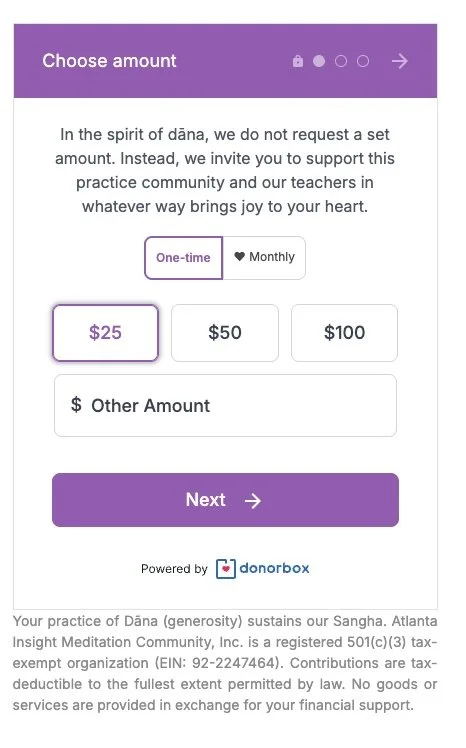
Step 1: Choose Your Amount
Select whether you would like to make a One-time gift or set up a recurring Monthly donation.
Click one of the suggested amounts or type a custom amount into the "$ Other Amount" box.
Click the Next button.
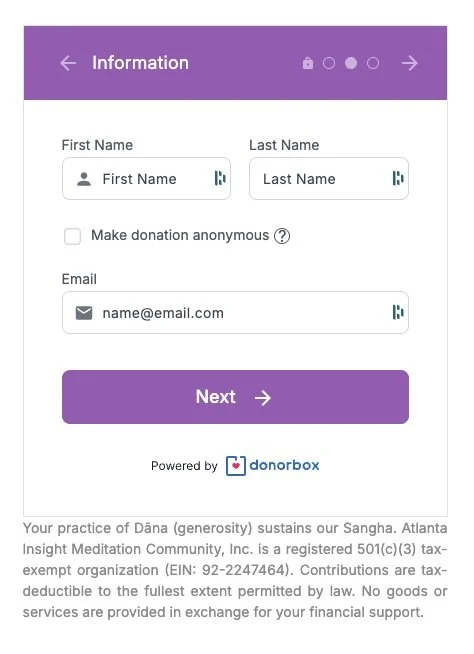
Step 2: Enter Your Information
Fill in your First Name, Last Name, and Email address.
If you prefer your gift not to be recognized publicly, simply check the "Make donation anonymous" box.
Click the Next button.
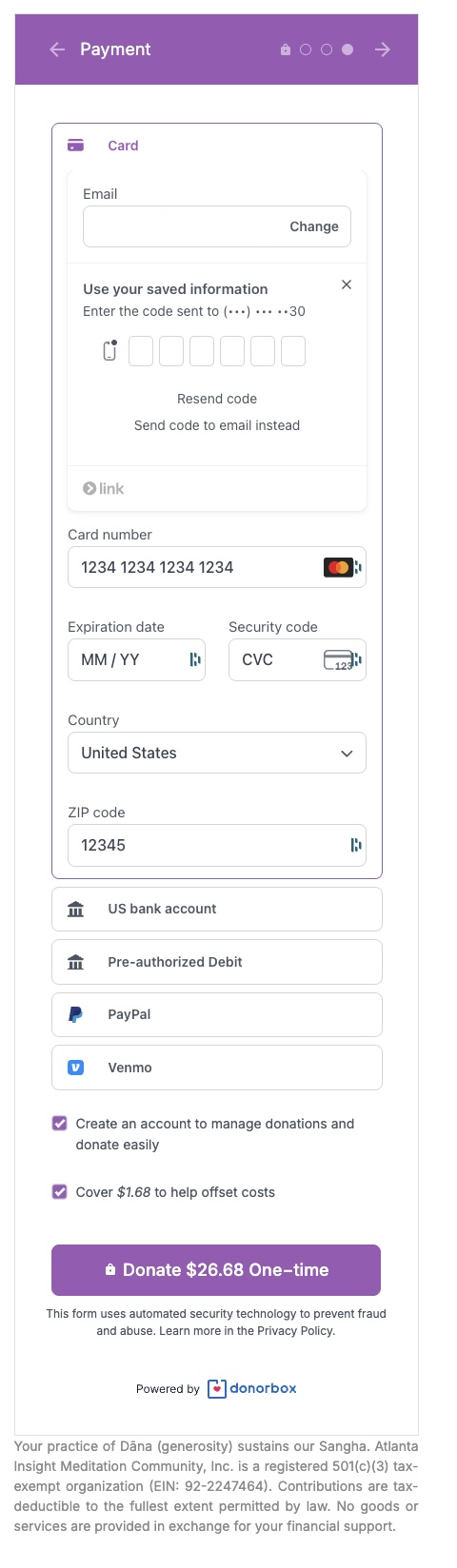
Step 3: Select Your Payment Method
Payment Options: Choose how you wish to give by clicking the corresponding button:
US bank account (Highly recommended for former Zelle/PayPal Giving Fund users)
Card
PayPal
Venmo
Create an Account: We encourage you to check the box to "Create an account to manage donations and donate easily." This allows for a one-step login in the future and gives you instant access to your own year-end tax reports.
Cover Processing Fees: You will see an optional checkbox asking if you'd like to add a small amount to offset processing costs. Checking this ensures 100% of your intended dāna goes directly to supporting our community.
Click the final Donate button to complete your transaction.